Journal

Topic: DXNest

2025–present

Founder / software developer

DXNest Motion

DXNest Motion is browser-based kinematics software for constructing, simulating, and analysing planar mechanisms — linkages, sliders, gears, racks, eccentric drives, rollers, and rolling segments. A mechanism is built on an engineering canvas, solved over its full input cycle, inspected as trajectories and motion curves, and exported as drawings or calculation data, with nothing to install.

It is the second product of DXNest and the direct commercial successor to a decade of mechanism calculation software written for die-cutting-press research. The companion product, DXNest Fabrication, covers CAD/CAM production preparation.
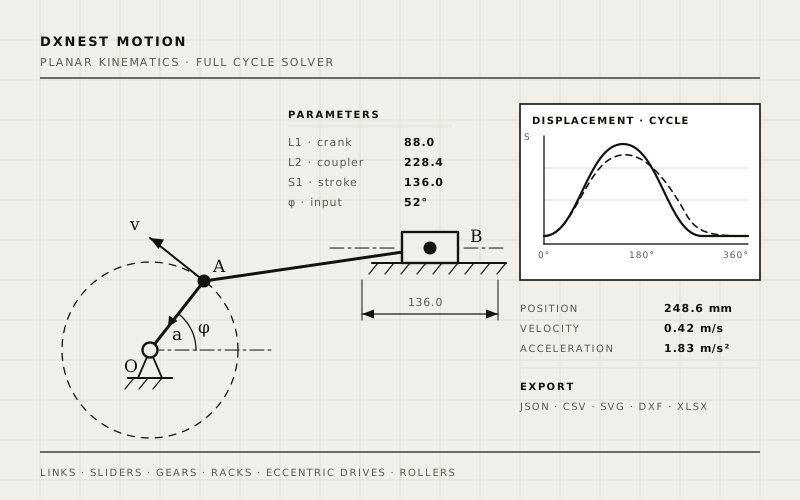
DXNest Motion workspace: a planar linkage on an engineering canvas with trajectory, velocity vectors, and a displacement graph
DXNest Motion — mechanism canvas, solved trajectory, velocity vectors, and cycle graph.

What it does

  • Builds planar mechanisms from links, revolute pairs, one- and two-link slider groups, and pivoted slotted-link mechanisms.
  • Models multi-wheel external gear trains, internal gears and gear sectors, fixed and driven racks, eccentric drives, roller contacts, and rolling pressing segments.
  • Solves the complete input cycle with a constraint solver and animates every solved position.
  • Calculates displacement, velocity, and acceleration for points, links, sliders, gears, segments, and roller contacts.
  • Overlays calculated curves from several mechanisms open in different tabs for direct comparison.
  • Exports project data and results as JSON, CSV, SVG, DXF, and XLSX, including per-object cycle tables and charts.

Why it exists

The kinematic comparison of drive mechanisms that underpins this line of research — wedging drives, two-slider layouts, additional driven cranks, and double-wedging mechanisms — previously required custom desktop programs, Mathcad models, and SolidWorks Motion studies stitched together by hand. DXNest Motion collapses that workflow into one browser workspace, so a mechanism concept can be dimensioned, solved, compared against alternatives, and exported into engineering documentation in a single session.

Architecture & stack

An interactive SVG engineering canvas with multiple mechanism tabs, an object list, parameter and dimension panels, and light and dark drafting themes, backed by a constraint-based cycle solver with differentiated velocities and accelerations. Built as a browser application on a React and Python stack; projects are kept in the user account at motion.dxnest.io.

Research lineage

The solver and the comparison workflow grew out of six Ukrainian software copyright certificates for mechanism synthesis and analysis programs and out of peer-reviewed work on die-cutting-press pressure-plate drives. See the Publications and Patents & certificates pages for the underlying research record.
2024–present

Founder / software developer

DXNest Fabrication

DXNest Fabrication is a CAD/CAM software system for automated production preparation in sheet-metal and facade fabrication. It reads DXF drawings and Excel part lists, nests parts onto stock sheets, and generates CNC programs, bills of materials, packing slips, labels, PDF documents, and Excel reports — replacing hours of manual drafting and CNC preparation.

It is one of the two products of DXNest, the independent engineering-software line founded and developed by Vitalii Vlakh. The companion product, DXNest Motion, covers mechanism design and kinematic analysis.

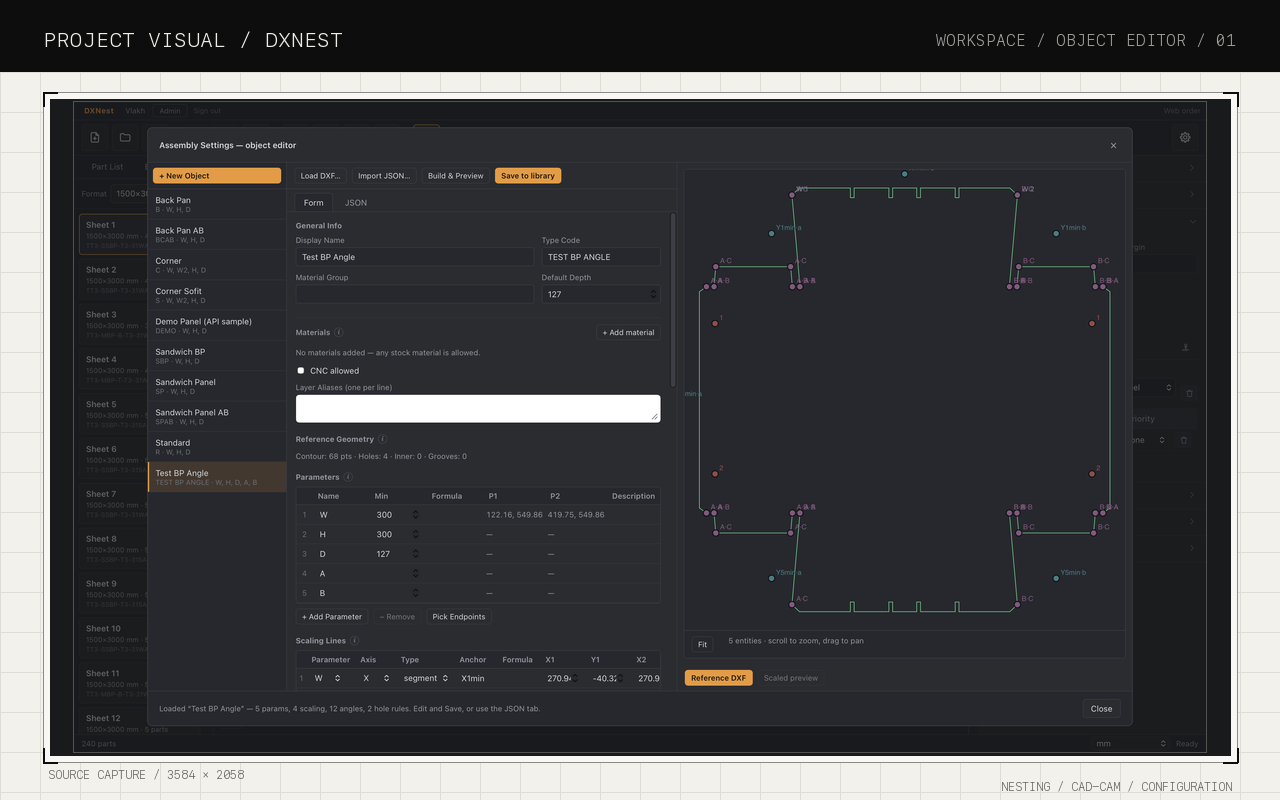
DXNest Fabrication application window showing a part in the assembly-settings view
DXNest Fabrication — assembly settings, part geometry, and the sheet library.

What it does

  • Reads DXF drawings and Excel part lists, detects contours and geometry, and validates parts before production.
  • Generates parametric panel geometry — angles, holes, and scaling rules — from drawings or predefined panel types.
  • Nests parts across multiple sheet sizes and available stock with rotation, spacing, boundary, and collision constraints to reduce waste.
  • Generates CNC programs, bills of materials, packing slips, labels, material estimates, waste calculations, and PDF/Excel reports.
  • Provides an interactive interface for part configuration, parametric geometry editing, material/sheet selection, and job management.

Engineering results

  • Preparation of a 40-panel job reduced from about 2 hours to roughly 5 minutes.
  • A 300-part drawing-to-CNC workflow completed in about 15 minutes instead of nearly a full working day.
  • 500-panel projects prepared end to end in 15–20 minutes instead of about two days of manual work.
  • Material, sheet-format, and part-template libraries supporting ~10 projects and ~900 sheet-metal parts.

Architecture & stack

Modular architecture separating the interface, DXF geometry engine, nesting algorithms, CNC-generation modules, and export functionality. The Windows desktop application is built with Python, PyQt6, ezdxf, Shapely, pandas, openpyxl, and NumPy; a browser edition runs the same nesting and CNC pipeline with team accounts and shared projects. Development is version-controlled across separate desktop, web, and website repositories.

Intellectual property

DXNest is registered with the Canadian Intellectual Property Office — Copyright Registration No. 1238472 (2025). View the copyright certificate (PDF). Product page: dxnest.io/fabrication.